

This article serves as a central hub for understanding and using the Noraxon EMG Biofeedback App for clinicians, researchers, and performance and rehab professionals.
In this guide, users will learn:
- How to place EMG sensors
- How to operate each app mode and when to use them
- Biofeedback Mode
- Template Training Mode
- Work/Rest Mode
- Visual Feedback Options for Biofeedback and Work / Rest mode
- Troubleshooting and FAQs
For more detailed descriptions of each function in the app, including licensing, creating patience, and maintaining a database, reference the Biofeedback App User Guide 🔗.
App License Registration & Activation
Download and Install the Biofeedback app from the Apple App Store or Google Play Store, and allow the app to access your camera and photo library.
TIP: You can also select Demo Mode to explore the app without a license.
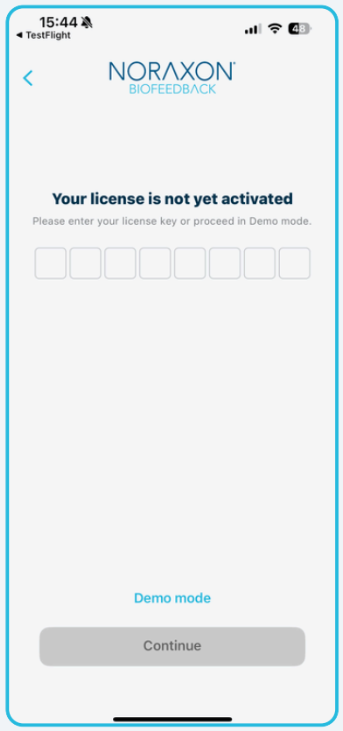
Click Register License and enter your 8-character license number.
You’ll be prompted to enter your email address to proceed with verification, after which you’ll get a one-time password (OTP) to log into the app.
See the Biofeedback App User Guide🔗for more details on license and registration.
Sensor Placement
The video above demonstrates electrode placement for both Core EMG and Ultium EMG sensors on the vastus medialis. For more detailed recommendations on electrode placement visit the following resources:
Biofeeback Mode
Biofeedback Mode provides real-time visual feedback of EMG activity, allowing patients to see how and when a muscle is activating during movement or exercise. This mode is best suited for building awarenes, improving voluntary muscle control, and reinforcing correct activation patterns.
Unlike structured Work / Rest or template training modes, Biofeedback Mode emphasizes continuous feedback with the ability to optionally assign a target for muscle activation amplitude, making it ideal when the goal is to help a patient understand and modulate their muscle activity in real time.
The video below goes through the full biofeedback mode workflow, including:
- Configuring sensors
- Selecting muscle groups to test
- Performing an MVC (optional)
- Adjusting thresholds and visualizations during the biofeedback session
- Creating a report and adjusting report settings
- Exporting a report
When Should I Use Biofeedback Mode?
Biofeedback Mode is most effective when the primary goal is education and motor learning, rather than endurance or performance against a predefined target.
Common use cases include:
- Teaching a patient how to activate a muscle for the first time
- Reducing compensatory muscle activity
- Improving coordination between agonist and antagonist muscles
- Providing immediate feedback during functional tasks
Rehabilitation Examples
Biofeedback Mode is commonly used in rehabilitation settings such as:
-
Post-surgical activation training
Helping patients visualize quadriceps or glute activation following knee or hip surgery. -
Neuromuscular re-education
Improving selective activation in patients with neurological conditions or motor control deficits. -
Inhibition of overactive muscles
Teaching patients to reduce excessive upper trapezius activity during shoulder elevation. -
Pelvic floor training
Providing immediate feedback to reinforce correct activation and relaxation patterns. -
Early-stage return to movement
Monitoring muscle engagement during low-load functional tasks such as sit-to-stand or gait initiation.
Template Training Mode
Template Training Mode provides guided EMG biofeedback based on a reference activation pattern, allowing a muscle in need of rehabilitation to be trained against the activation behavior of a healthy or desired muscle.
This mode always uses two EMG sensors:
-
Template Muscle – the reference muscle that defines the target activation pattern
-
Training Muscle – the muscle being rehabilitated or retrained
By comparing real-time EMG activity of the training muscle to the template, Template Training Mode helps patients re-learn appropriate activation timing, magnitude, and consistency.
The video below goes through the full template training workflow, including:
- Configuring sensors
- Selecting muscle groups to test (template muscle and training muscle)
- Performing an MVC (optional)
- Performing the template contractions with the template muscle
- Performing the training contractions with the training muscle
- Creating a report and adjusting report settings
- Adjusting template thresholds
When Should I Use Template Training Mode?
Template Training Mode is best suited for later-stage rehabilitation and motor pattern refinement, when a patient can already activate the muscle but needs help restoring normal or symmetrical activation patterns.
This mode is especially valuable when:
-
One limb or muscle is healthy and can serve as a reference
-
Symmetry is a primary rehabilitation goal
-
The patient needs guidance beyond simple activation awareness
Unlike standard Biofeedback Mode, Template Training Mode provides a clear target to match, rather than open-ended feedback.
Rehabilitation Examples
Common clinical and performance applications include:
-
ACL rehabilitation (bilateral comparison)
Using the rectus femoris or vastus medialis from the healthy limb as a template to retrain activation patterns on the involved side during knee extension or functional tasks. -
Post-injury unilateral deficits
Retraining gluteus medius activation following hip injury by referencing the contralateral limb. -
Neurological rehabilitation
Using the less-affected side as a template to guide improved activation timing and consistency on the affected side. -
Return-to-sport training
Refining muscle activation symmetry during sport-specific movements once strength has largely returned. -
Motor pattern normalization
Reducing abnormal activation strategies that developed during compensation phases of injury.
Work/Rest Mode
Work/Rest Mode provides structured EMG biofeedback across repeated work and rest intervals, guiding patients to consistently meet a target muscle activation level over multiple repetitions.
This mode supports up to two EMG sensors simultaneously, allowing clinicians to monitor and train single muscles, muscle groups, or coordination patterns within a controlled timing framework.
By combining time-based intervals with activation thresholds, Work / Rest Mode is ideal for building consistency, endurance, and control in muscle activation.
How Work/Rest Mode Works
Work/Rest Mode is configured by programming:
-
Work duration (seconds)
-
Rest duration (seconds)
-
Number of repetitions
-
Target EMG activation threshold
During each work phase, the patient is guided to reach and maintain the programmed EMG threshold. Visual and/or auditory feedback indicates whether the target is being met.
The movement performed during the work phase may be:
-
Isometric (e.g., sustained contraction)
-
Repetitive (e.g., repeated lifts or cyclic movements)
Each repetition reinforces consistent motor output while the rest phases allow recovery.
The video below goes through the full template training workflow, including:
- Configuring sensors
- Selecting muscle groups to test (template muscle and training muscle)
- Performing an MVC (optional)
- Performing a Work/Rest activity
- Creating a report
When Should I Use Work/Rest Mode?
Work/Rest Mode is best suited for mid- to late-stage rehabilitation, when a patient can voluntarily activate the muscle but needs to improve:
-
Consistency of activation
-
Ability to reach and sustain a target effort
-
Control across repeated contractions
-
Fatigue awareness and management
Unlike open-ended Biofeedback Mode, Work/Rest Mode introduces clear performance expectations for every repetition.
Rehabilitation and Training Examples
Common clinical and performance applications include:
-
Quadriceps strengthening after knee surgery
Training consistent activation levels across repeated isometric contractions following ACL reconstruction or total knee arthroplasty. -
Rotator cuff endurance training
Programming repeated work/rest intervals to improve sustained activation during shoulder stabilization exercises. -
Core and pelvic stability training
Monitoring multiple muscles simultaneously during static or repetitive stabilization tasks. -
Return-to-function conditioning
Gradually increasing work duration or threshold level as tolerance improves. -
Neuromuscular fatigue awareness
Helping patients recognize declining activation levels across repetitions.
Visual Feedback Options
Biofeedback Mode and Work / Rest mode offer multiple visual feedback formats. Choosing the appropriate visualization can significantly impact patient understanding and engagement.
Bar View
Bar graphs provide a simple, vertical representation of muscle activation amplitude, making them easy to interpret for first-time users.
Recommended when:
-
Working with new patients
-
Teaching basic on/off muscle activation
-
Providing feedback to individuals with cognitive or attentional limitations
-
Comparing relative activation between muscles
Why it works:
The direct relationship between bar height and muscle activation makes it highly intuitive and easy to explain.
Line View
The line graph displays continuous EMG activity over time, allowing users to see how activation changes throughout a movement or exercise.
Recommended when:
-
Training coordination and sequencing
-
Evaluating muscle timing during dynamic tasks
-
Identifying onset, offset, or sustained activation
-
Working with advanced or athletic populations
Why it works:
It provides temporal context, helping users understand when a muscle activates, not just how much.
Circle View
Circle View represents muscle activation as a squeezing circle, allowing patients to connect a visual with squeezing a muscle.
Recommended when:
-
Using EMG for pelvic floor physical therapy
- Using biofeedback for concentric movements that create a “squeeze” in the shortened muscle position
Why it works:
The simplified design encourages patients to connect with “squeezing” a muscle to activate it.
Camera View
Camera View synchronizes real-time EMG feedback with live or recorded video, allowing patients to connect what they see in their movement with what their muscles are doing.
Recommended when:
-
Teaching technique or form
-
Gait and functional task training
-
Return-to-sport or return-to-work scenarios
-
Improving movement awareness and motor learning
Why it works:
Seeing movement and muscle activity together reinforces cause-and-effect learning.
Troubleshooting & FAQs
Q: When should I use an MVC?
A: Without an MVC, the EMG signal is just a raw electrical amplitude. That number by itself doesn’t tell you whether the muscle is activating at 10% effort, 50% effort, or near maximum. An MVC allows the system to express muscle activation as a percentage of the patient’s maximum, which makes the feedback meaningful and clinically actionable.
If you don’t know what 100% is, seeing “30 units” on the screen doesn’t tell you much. But if you know the patient’s maximum is 100 units, then 30 units clearly represents 30% effort. That makes it much easier to prescribe targets, track progress, and guide training.
Q: My sensors don’t appear in the list when assigning senors for a session in any mode.
A: Check to make sure your license is activated. If you have an active license, the bluetooth functionality required for sensor communication will be enabled.
If you have an active biofeedback app license, check to ensure the sensors you want to connect to the session are turned on (blinking blue) and close to the tablet. If the sensor is still not visible in the list, try powering the sensor off and back on.
If you have the MR software, check to ensure the sensors you want to use for Biofeedback aren’t part of an active session in the MR software or on another device.
Q: What kind of processing is applied to the raw EMG signal through the app?
A: A 10-500 Hz bandpass filter is applied to Ultium EMG sensors, and a 20-500 Hz bandpass filter is applied to Core EMG sensors. Both are filtered with an RMS Smoothing window of 100 ms before streaming over BLE.