

Noraxon’s Lab Streaming Layer (LSL) integration enables real-time streaming of data from myoRESEARCH (MR) to any application that supports the Lab Streaming Layer protocol. This allows researchers to synchronize Noraxon physiological and biomechanical data with other hardware and software platforms in a common time domain for multimodal data acquisition.
The integration is provided through an open-source Noraxon MR → LSL Bridge application available on 🔗GitHub. The bridge receives data from myoRESEARCH via HTTP Streaming and publishes appropriately timed LSL outlets that can be recorded or consumed by applications such as LabRecorder, OpenViBE, Unity, MATLAB, Python, and other LSL-compatible software.
Compatible Hardware
Only the following Noraxon hardware is supported:
- Ultium Receiver (required)
The following sensor systems connected to the Ultium Receiver are compatible:
- Ultium EMG
- Core EMG
- Ultium Motion
For Ultium Motion, both of the following data types can be streamed:
- Raw IMU sensor data
- Biomechanical joint angles
Compatible Software and Firmware
To check your eligibility to access the latest versions of MR, reference the 🔗MR Maintenance Status Check Tool.
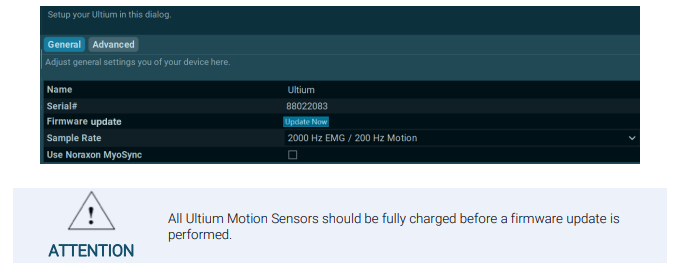
After upgrading software, upgrade your Ultium system firmware, if required. Firmware version 11.39 or newer is required for use with the Noraxon LSL GitHub repository.
Check or Upgrade firmware for the Ultium system in the Ultium Hardware Setup within MR. If available, a firmware upgrade will be prompted with an Upgrade button as shown below.
Required Downloads
Download the Noraxon MR → LSL Bridge source code and installation instructions are available on GitHub.
GitHub Repository:
The repository includes:
- Python bridge application
- Installation instructions
- README documentation
- Required Python dependencies
How It Works
The integration follows this workflow:
- Configure HTTP Streaming in myoRESEARCH.
- Start an MR measurement.
- Launch and connect the MR → LSL Bridge.
- Subscribe to or record the published LSL streams from your LSL-compatible application.
The bridge automatically creates LSL outlets for channels that include valid timing information while preserving synchronized timestamps from myoRESEARCH.
Configuring myoRESEARCH (MR)
Before using the bridge, configure the following settings in myoRESEARCH.
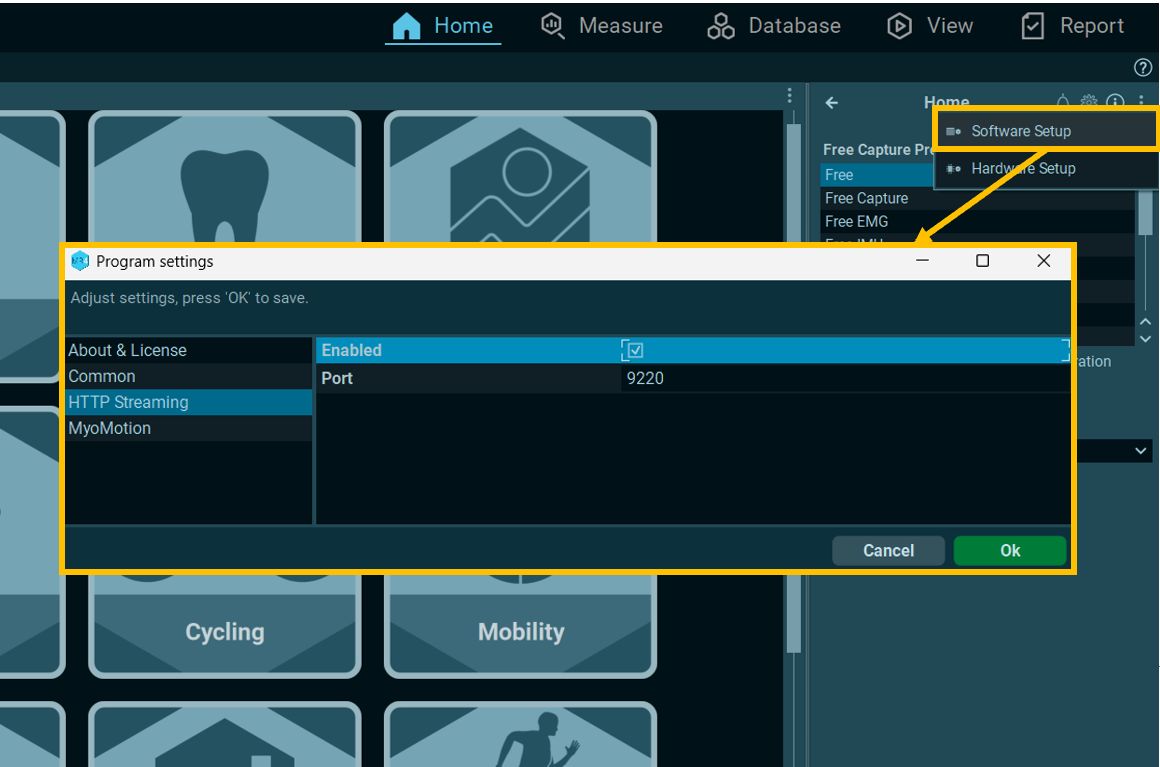
1. Enable HTTP Streaming
- Navigate to Software Setup → HTTP Streaming
- Enable HTTP Streaming
- Set the port to 9220 (default), or note the configured port if using another value
2. Enable Clock Synchronization
Within the Ultium Hardware Setup, enable:
Sync Ultium and PC Clocks

This option allows myoRESEARCH to provide accurate timing information required for LSL timestamp generation.
3. Start a Measurement
Begin the measurement in myoRESEARCH before connecting the LSL bridge.
The bridge only connects while an active measurement is running and HTTP Streaming is available.
More Information
For further details on Connecting to the Noraxon MR → LSL Bridge, Recording data, and troubleshooting, refer to the README documentation within the free GitHub repository.